38 Cloud session control + admin re-auth
draft
Google Cloud sessions — the Cloud Console and gcloud/Cloud SDK — carry their own session policy, entirely separate from the Workspace web session. New Google Cloud customers get a 16-hour session length enforced by default, but older organizations may default to never requiring reauthentication — there, a stolen laptop or an exfiltrated token keeps working indefinitely. This forces re-authentication on a short timer (1 hour is the floor, 24 hours the ceiling), and the method matters: a password re-auth is defeated by a phished credential, a security key is not.
Documentation: Set session length for Google Cloud services ↗ · Best practices for mitigating compromised OAuth tokens for Google Cloud CLI ↗
Caveats
Setup steps
- open ↗
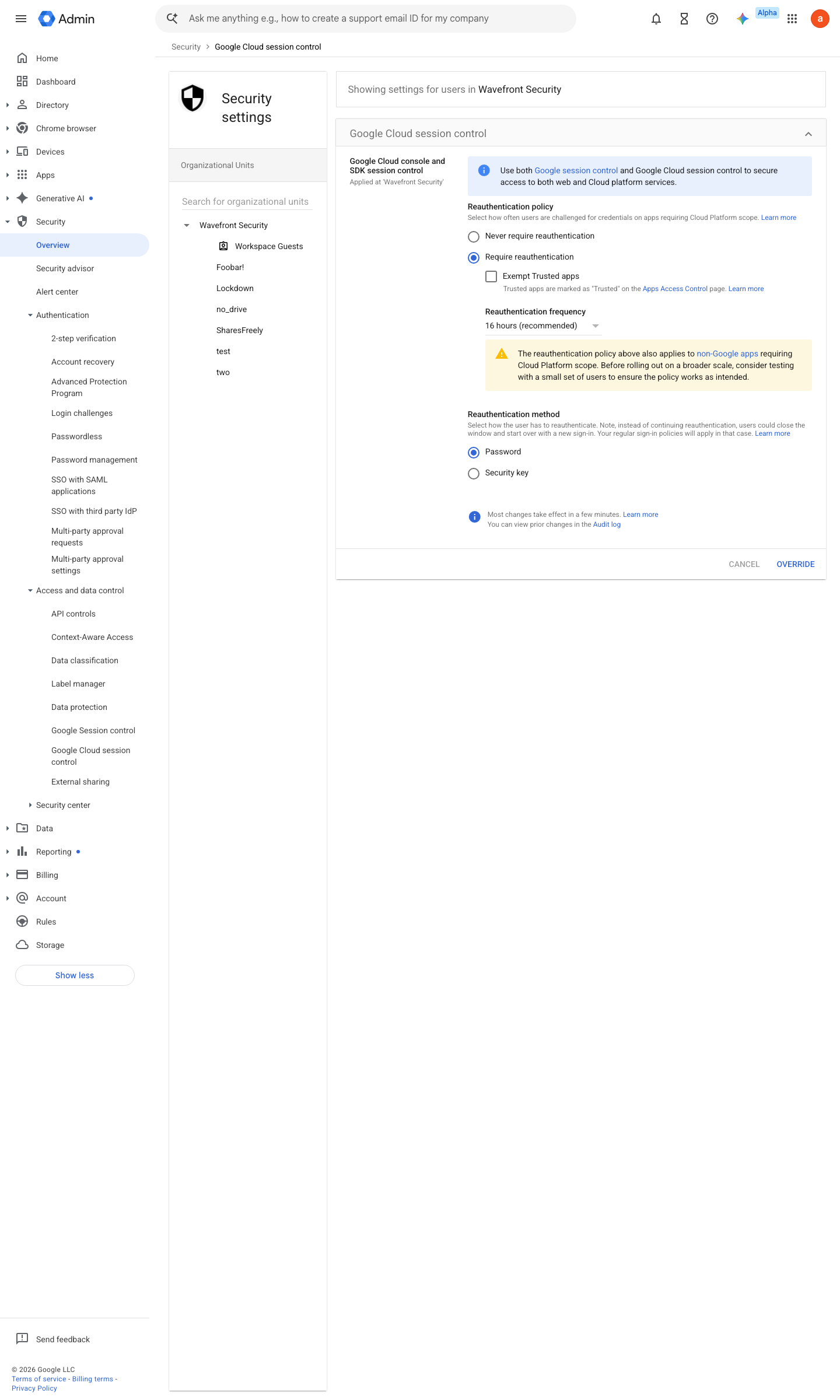
https://admin.google.com/ac/security/reauth/admin-tools · captured 2026-07-15
Security › Access and data control › Google Cloud session control- Reauthentication policy
Require reauthentication
-
Security › Access and data control › Google Cloud session control- Reauthentication frequency
1 hour
-
Security › Access and data control › Google Cloud session control- Reauthentication method
Security key (where FIDO2 is deployed) rather than Password
How to verify
-
Leave a gcloud/console session past the configured window, then run any privileged command — it must demand re-authentication.
gcloud projects list # after expiry: prompts for reauth
draft v0.0.3 Prevent policy #3 · #29 ↗